
(※ This article is written by a Japanese engineer at Astah who is trying to learn English.)
Hi,This is SANE,sales
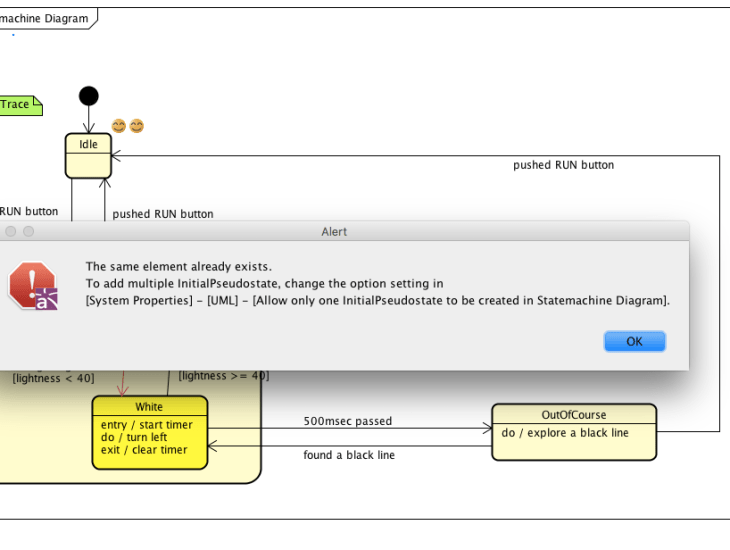
In default, you can’t create multiple Intial Pseudo states on Statemachine Diagram in Astah.
I guess that in process you are considering behavior on Statemachine Diagram, you want to create multiple Initial Pseudo States.
By change the settings in Astah, You can create multiple Initial Pseudo States. Please try.
HOW TO
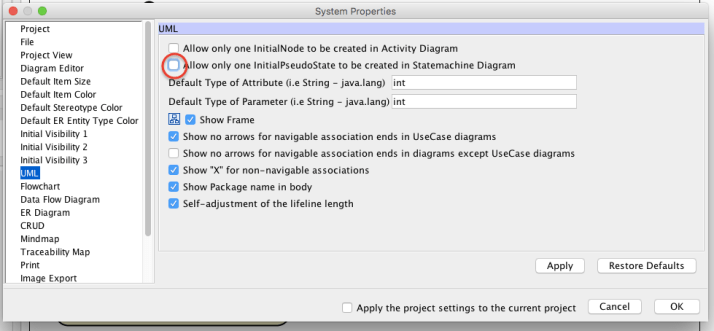
1.Go to [Tools] – [System Properties] from main menu to open the System Properties dialog. And Chose [UML] from left menu.
2. Please uncheck [Allow only one InitialPseudoState to be created in Statemachine Diagram] to create two or more InitialPseudoState to be created in Statemachine Diagram.
NOTE:I had deleted a model from a diagram but it seems to exist in the project still.
http://astah.net/qa/setup/delete
 Astah in 5min