

■Product and version:
All of the editions and versions
■Description:
There are two bugs when you run Astah on macOS High Sierra.
- Astah’s Main Menu does not appear if you run Astah in a language other than English
fixed in macOS High Sierra 10.13.1 update. (Oct.31, 2017)
- You cannot tell which button is toggled on Astah’s diagram tool bar
fixed in Astah 8.0 (Sep.26, 2018)
■Solution(1)
There are two ways to solve the problem (1).
A: Launch Astah in English
Click on the Apple Menu on the top left of the screen. Go to [System Preferences] – [Language and Region] and bring English to the top in the [Preferred languages:] field, then launch Astah.
B: Move Astah menu within the Astah window
- Right-click on Astah’s app file and click [Show Package Contents]
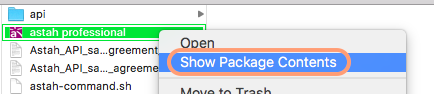
- You will find the “info.plist” file in the [Contents] folder. Open it with text editor.
- Change the value of “-Dapple.laf.useScreenMenuBar” to false and save.

- Now Astah main menu appears within Astah’s window.

■Solution (2)
Go to [View] – [Look & Feel] and change it other than [Mac OS X].
 Astah in 5min