

We’ve received several emails from our customers about how to draw N-ary associations using Astah.
Actually, we received one today (Thank you, Salim!). So will write my response in public. 🙂
Here’s one email example (from Arnaud):
I’d ike to know if it is possible to create a multiple association class using a diamond icon ? I did not fnd it on UML 2.5 spec but in some diagrams over the net.
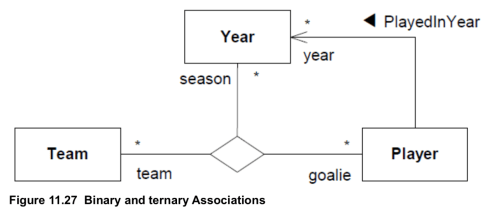
This is the figure from OMG’s Unified Modeling Language 2.5.1 (P. 204).
Currently, Astah doesn’t support it, but there is a way to depict a diamond symbol in Class diagrams.
With Astah, you can upload image files and allocate them to stereotypes. So I’ll show you how to depict N-array relationships using this functionality.
1. First of all, this functionality is available in Astah Professional only – If you don’t have it, get a free trial.
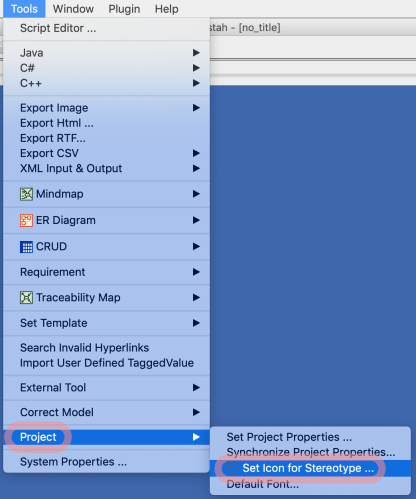
2. Create a project and go to [Tools] – [Project] – [Set Icon for Stereotype]
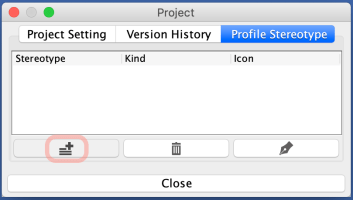
3. A [Project] dialogue appears. Click [Add] button.
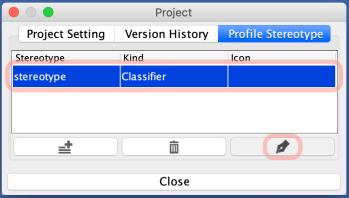
4. One item will be added. Select it and click [Edit] button – which is the pen icon on the right bottom.
5. Upload a diamond image file, add information and specify which Stereotype this image should be related to…etc. I’ll make it related to “n-ary” stereotype for now.
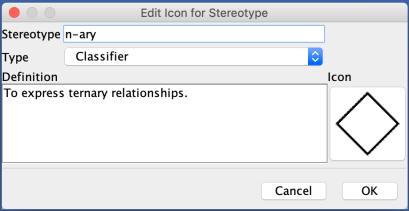
6. Create a diagram, use a Class for where you want to replace with a diamond icon.
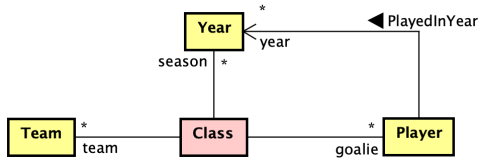
7. Add n-ary stereotype to the Class

8. Keep the focus on the class and go to main menu. Open the drop-down from the icon located 2nd from the right. (Or you can do [Icon Notation] – [Customize Icon] from the Class’s Pop-up menu.)
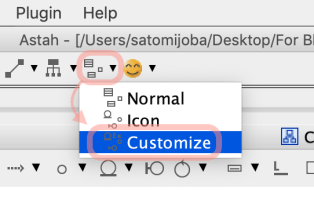
9. The Class will turn into the diamond icon.
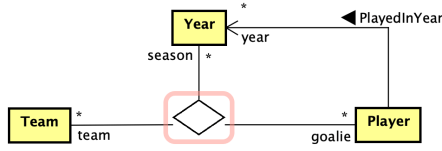
This functionality is extremely helpful when you want to raise the visibility level of diagrams to make it easier for anyone to understand what your diagrams describe.
Below is one sample diagram Astah user has created using this functionality. With familiar icons or visuals, it is much easier and faster to understand the relations and systems on the diagrams more than a diagram with a bunch of boxes.
http://softwarehard.blogspot.com/2017/08/how-to-depict-professional-looking.html
Hope this blog helps you make diagrams more expressive!
– Satomi
 Astah in 5min
Thank you. I’ve been looking for this option. However, my diamond still has a class name, unlike your pictures. I can’t figure out how to remove that class name. I’m using Astah professional, 8.2.0/b743f7.
Hi
Is there an easy method of “hiding” the class name, when implementing the customizations described in this blog post?
Background:
I am a software engineering student at a Scandinavian higher learning institution, where we use Astah.
Part of our curriculum includes Entity Relationship (ER) diagrams and Enhanced Entity Relationship (EER) diagrams as part of developing database structures. Our main reference book is Database Systems, 6th edition, by Thomas Conolly and Carolyn Begg.
Astah does have a ER diagram option, but these diagrams are not in the format described by the previous book. As such we are utilizing a customized version of an UML Class Diagram (with certain features/information manually hidden).
This approach works for the most part, but has a draw back as it relates to representing n-ary relationships. We wish to represent the n-ary relations in a manner as shown in the mentioned book:
link: https://imgur.com/a/bIpCLJb
What I am currently able to do, using Astah, is to create a diagram that is mostly similar to the text-book presentation, using the method described in this blog post. This is shown below:
link: https://imgur.com/a/e3yOBdO
As can be seen in the Asta screenshot, we see how the Class Name remains visible. I am of course able to simply name the class ” “, but this leaves a white-space on one side before the relations converge at the diamond.
I am hopeful that a good solution to this tiny issue can be clarified!
Thank you for your time!
(Astah Professional v. 9.2.0/0248cd)
Hi Kristian,
Thank you for your detailed comment and feedback! We appreciate your input and are glad to hear about your experience using Astah for your studies.
As of the current version of Astah Pro (v. 9.2.0/0248cd), the specific feature to hide class names in the manner you described is not implemented unfortunately.
I will share your feedback and suggestions with our development team for consideration in future updates about implementing the presentation of N-ary relations and adding the flexibility to hide class names if the N-ary presentation support won’t be happening soon.
– Satomi from Astah